Mailroom Cheque Scanning: Right-Sizing Your Capture Operation
Most mailrooms do not start with an empty room and a hardware shopping list. They already have cheque scanners, operator PCs, endorsement procedures, and a deposit workflow that people know how to run. The practical deployment question is: can Chequedb use that existing capture estate, and where are the real capacity or compatibility gaps?
Start by proving the scanners you own. Connect one representative device, run your cheque mix through the complete workflow, and measure sustained throughput before deciding that hardware must be replaced. Chequedb should add a shared capture and validation layer around the operation—not force a working mailroom to start over.
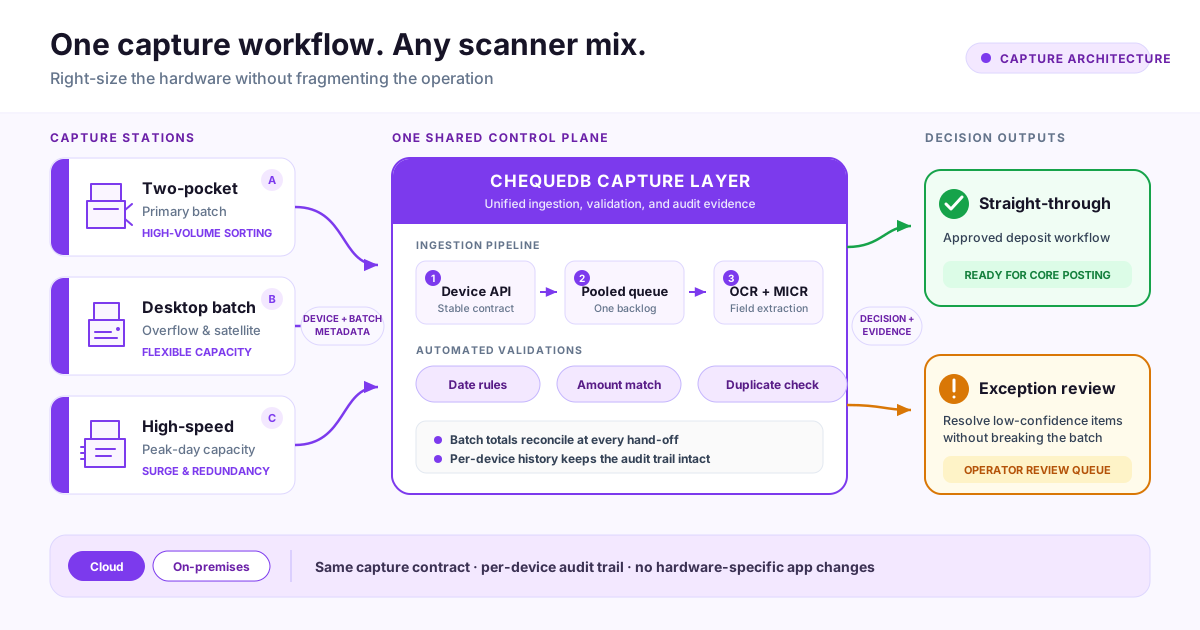
Existing scanners can serve different roles while Chequedb provides one device contract, pooled queue, validation policy, exception workflow, and audit trail.
Start with the scanners already in the room
An existing scanner is a candidate for reuse when it can reliably deliver the inputs the capture workflow needs: usable front and back images, MICR data or a readable MICR line, stable device control, and consistent batch handling. The integration may use a vendor SDK, TWAIN, a local capture adapter, an API, or a controlled file hand-off, depending on the device and current software.
Build a simple fleet inventory before changing anything:
| Check | Record for each station | Why it matters |
|---|---|---|
| Device identity | Manufacturer, model, serial number, age | Separates tested devices from assumptions |
| Software interface | Vendor SDK, TWAIN, API, watched folder, or export | Determines the capture-adapter path |
| Image output | Front/back, colour or grayscale, DPI, file format | Confirms OCR and archive inputs are usable |
| MICR and endorsement | MICR output, rear endorsement, pocket routing | Identifies functions that must remain device-controlled |
| Workstation | OS, driver version, USB/network connection | Exposes deployment and support constraints |
| Operating condition | Feed reliability, double-feeds, jams, maintenance history | Prevents a software pilot from hiding a mechanical problem |
| Current hand-off | Deposit file, core system, ERP, archive, or review queue | Defines what the new workflow must preserve |
Do not treat a model name as proof of compatibility. Test the exact driver, workstation, image output, and batch behaviour in the room. A scanner that is mechanically sound but exposes no maintainable integration path may need an adapter or eventual replacement; a less glamorous device with stable output may be perfectly suitable.
Keep the hardware jobs separate from the software jobs
The scanner should keep doing the work closest to the paper: feeding, imaging, MICR capture, endorsement, and pocket routing where available. Chequedb takes responsibility once the item is captured:
| Existing capture estate | Chequedb workflow layer |
|---|---|
| Feeder, transport, camera, MICR head | Stable device/API contract |
| Endorsement and physical pocket routing | One pooled work queue across stations |
| Operator workstation and local device driver | OCR, MICR normalisation, and field confidence |
| Existing batch and deposit procedures | Date, amount, and duplicate validations |
| Existing downstream system | Exception review, reconciliation evidence, and audit history |
This boundary matters during deployment. It lets the team diagnose a feed problem as a device issue, an unreadable field as an image or extraction issue, and a rejected item as a policy decision. It also prevents each scanner station from becoming its own disconnected backlog.
Assign roles to the fleet you already have
Different scanner types can share one workflow without pretending they have the same capacity.
- Primary batch station: the most reliable feeder or two-pocket unit handles the normal daily volume.
- Overflow or satellite station: a desktop batch scanner absorbs late arrivals, smaller batches, or work from another office.
- Peak-day or recovery station: a higher-speed or spare device protects the cut-off when volume spikes or the primary station is unavailable.
Those are operational roles, not purchasing categories. A scanner can change roles after the pilot reveals its actual sustained throughput and jam rate. The pooled queue lets operators work against one backlog while Chequedb records which device and batch produced each item.
Measure sustained throughput, not the number on the box
Estimate your mailroom scanner capacity
Start with the scanners you already own. Adjust the assumptions, then validate the estimate with a representative production batch.
Use the busiest credible day, not the monthly average.
Count from the latest realistic mail arrival to the required hand-off.
Include devices that can actually be staffed during the processing window.
For a mixed fleet, use the slower primary device or calculate each station separately.
50% is a reasonable starting point for reloads, jams, mixed paper, and operator time.
Protects the cut-off against late arrivals, re-scans, and volume variation.
Your installed fleet meets this planning target
The recommendation includes 25% volume headroom and one spare device for outage cover.
Working scanners
1
needed for buffered volume
Recommended installed
2
working plus resilience
Estimated clear time
31 min
all installed scanners running
Window capacity
28,800
+23,800 vs peak day
160 dpm × 60 × 50% = 4,800 items/hour per scanner
5,000 × 1.25 = 6,250 planned items
This is a planning estimate, not a hardware guarantee. Replace the sustained-rate assumption with measured pilot data before procurement or go-live.
Rated documents per minute is useful for comparing transport mechanisms, but it is not a mailroom capacity plan. Feeder reloads, mixed paper condition, double-feed recovery, endorsement checks, re-scans, exception handling, breaks, and shift handovers all consume time.
Measure each existing station with representative production batches:
- Record the start and end time for a complete batch.
- Count accepted items, re-scans, jams, and operator interventions.
- Include exception resolution and batch reconciliation—not only transport time.
- Repeat with the normal mix of cheque sizes, paper condition, and image quality.
- Use the lower sustained result for cut-off planning, then add operational headroom.
A useful capacity calculation is:
required station-hours = peak-day items ÷ measured sustained items per hour
Then compare required station-hours with the time available between the latest realistic arrival and the deposit cut-off. The gap—not the rated speed—tells you whether the current fleet is sufficient.
Worked example: an existing 5,000-cheque operation
Suppose the mailroom receives 5,000 cheques on a heavy day. It owns a two-pocket scanner and a desktop batch scanner, and scanning must finish before the 4:00 p.m. deposit cut-off.
During the pilot, the primary station sustains 3,600 items per hour across complete batches. The desktop station sustains 1,400 items per hour. Together, the installed fleet has enough raw capacity to clear 5,000 items in about an hour of simultaneous capture—but that is not yet a go-live decision.
The team should still prove that:
- either station can keep the queue moving if the other is unavailable;
- late courier arrivals still leave enough time for capture, review, and reconciliation;
- jams and re-feeds do not create duplicate records;
- exception reviewers can clear flagged items before the same cut-off; and
- the final deposit hand-off reconciles item count and amount.
If those checks pass, buying another scanner may add no operational value. If the room misses cut-off during realistic failure or peak-volume tests, the measurements show whether the gap is another station, a better feeder, additional exception-review capacity, or a downstream integration bottleneck.
Deploy Chequedb around the existing capture estate
Use a staged deployment rather than changing every desk at once.
1. Inventory and select a representative station
Choose the scanner and workstation that best represent the normal operation—not the newest device in the room. Record the driver, firmware, image settings, MICR output, endorsement behaviour, and current downstream hand-off.
2. Connect one device to the capture layer
Use the appropriate device API, local adapter, or controlled import route. Confirm that Chequedb receives the correct front/back images, device identity, batch identity, and available MICR fields. Keep the existing production workflow available while this is tested.
3. Run a representative cheque set
Include clean items, worn paper, different cheque layouts, handwritten amounts, low-contrast images, and known exceptions. A perfect demo stack proves very little about the real room.
4. Configure validation and exception policy
Set the rules for date validity, amount agreement, duplicate detection, confidence thresholds, and reviewer escalation. The goal is not to hide uncertainty; it is to route uncertain items into a controlled queue with the image and extracted fields side by side.
5. Preserve the downstream workflow
Connect approved results to the existing deposit, core-banking, ERP, archive, or reporting process through the agreed API or export. Reconcile item count and total amount at the hand-off. The Chequedb cheque management workflow can provide the approval, status, searchable record, and audit layer without requiring the scanner to own those responsibilities.
6. Choose cloud or on-premises placement
The capture contract can stay consistent while the Chequedb services run in the cloud or within the customer's environment. Choose on-premises when data-residency, network, or integration constraints require local processing; choose cloud when managed operations and simpler central access are the priority. Confirm the network path, identity controls, storage boundary, and failure behaviour before the pilot becomes production.
7. Parallel-run, measure, then scale
Run the new path alongside the current process long enough to cover normal volume, a peak period, exception cases, and a station interruption. Compare batch totals and outputs. Only then decide whether to keep, reassign, adapt, or replace each scanner.
What the operator sees at runtime
Every station sends captured items into one queue with device and batch metadata. Chequedb extracts the fields, applies the configured validations, and records the decision evidence.
- Straight-through items continue to the approved deposit workflow.
- Low-confidence or policy exceptions enter one operator review queue.
- Re-fed items can be checked against earlier captures to prevent duplicate processing.
- Batch totals remain visible across capture, review, approval, and downstream hand-off.
- Device history makes it possible to trace recurring image or feed problems back to a station.
This is the operational benefit of adding a shared layer above existing devices: scanner A, scanner B, and scanner C do not create three separate versions of the truth.
Go-live criteria for a mailroom deployment
Before cut-over, require evidence for all of the following:
- Every in-scope scanner produces acceptable front/back images and device metadata.
- MICR and endorsement behaviour match the agreed capture contract.
- A representative peak batch clears before cut-off with measured headroom.
- A scanner outage has a documented alternate-station procedure.
- Re-scans and re-feeds do not create uncontrolled duplicates.
- Exception ownership and escalation are clear.
- Item counts and amounts reconcile at the downstream hand-off.
- Operators can identify which station and batch produced any record.
- Cloud or on-premises network failure behaviour has been tested.
If the installed fleet fails one of these criteria, the result should identify a specific gap. Use the cheque scanner evaluation guide to test replacements against the same cheque set, and use the compatible scanner catalog when a measured capacity or integration gap genuinely requires new hardware.
For a deployment review based on your room, devices, cut-off, and downstream systems, start with Chequedb mailroom capture.
Frequently Asked Questions
Can Chequedb use the cheque scanners we already own?
Often, yes—but compatibility should be proven with the exact device, driver, workstation, and output in your mailroom. The key questions are whether the scanner can provide usable front/back images, MICR data or a readable MICR line, stable batch control, and a maintainable connection through a vendor SDK, TWAIN, API, adapter, or controlled file hand-off.
Do we need to replace our scanners before deploying Chequedb?
No. Start with an inventory and a one-station pilot. Replace or add hardware only when testing shows a specific integration, reliability, capacity, or redundancy gap that the current fleet cannot meet.
Can desktop and two-pocket scanners share one workflow?
Yes. They can serve different operating roles while feeding one pooled queue. Chequedb keeps device and batch metadata with each item, so the operation can load-balance work without losing traceability.
Should a mailroom deployment be cloud or on-premises?
That depends on data-residency, network, integration, and operating-model requirements. The important design goal is a consistent capture contract and workflow in either placement. Validate the network path, storage boundary, identity controls, and failure behaviour for the selected option.
How do we know whether the existing fleet has enough capacity?
Measure sustained items per hour using representative batches, including reloads, jams, re-scans, exception review, and reconciliation. Compare the resulting station-hours with the time available before cut-off, then test a station outage and a peak-volume day. Buy capacity only for the gap that remains.
What happens to our existing deposit or core-system workflow?
Keep it as an explicit deployment interface. Approved results should feed the existing downstream process through an agreed API or export, with item count and amount reconciliation at the hand-off. The pilot should prove that interface before production cut-over.