01
Frame the cheque
Show a visible frame and ask for a flat surface with a plain, contrasting background. Collect the back image when the bank requires an endorsement.
MOBILE CHECK DEPOSIT · INTEGRATION
Add cheque capture to a banking app with the Chequedb mobile SDK. Photograph the front and back, send the image from your backend to the cheque OCR API, and confirm the handwritten amount, payee and date before the deposit item continues.
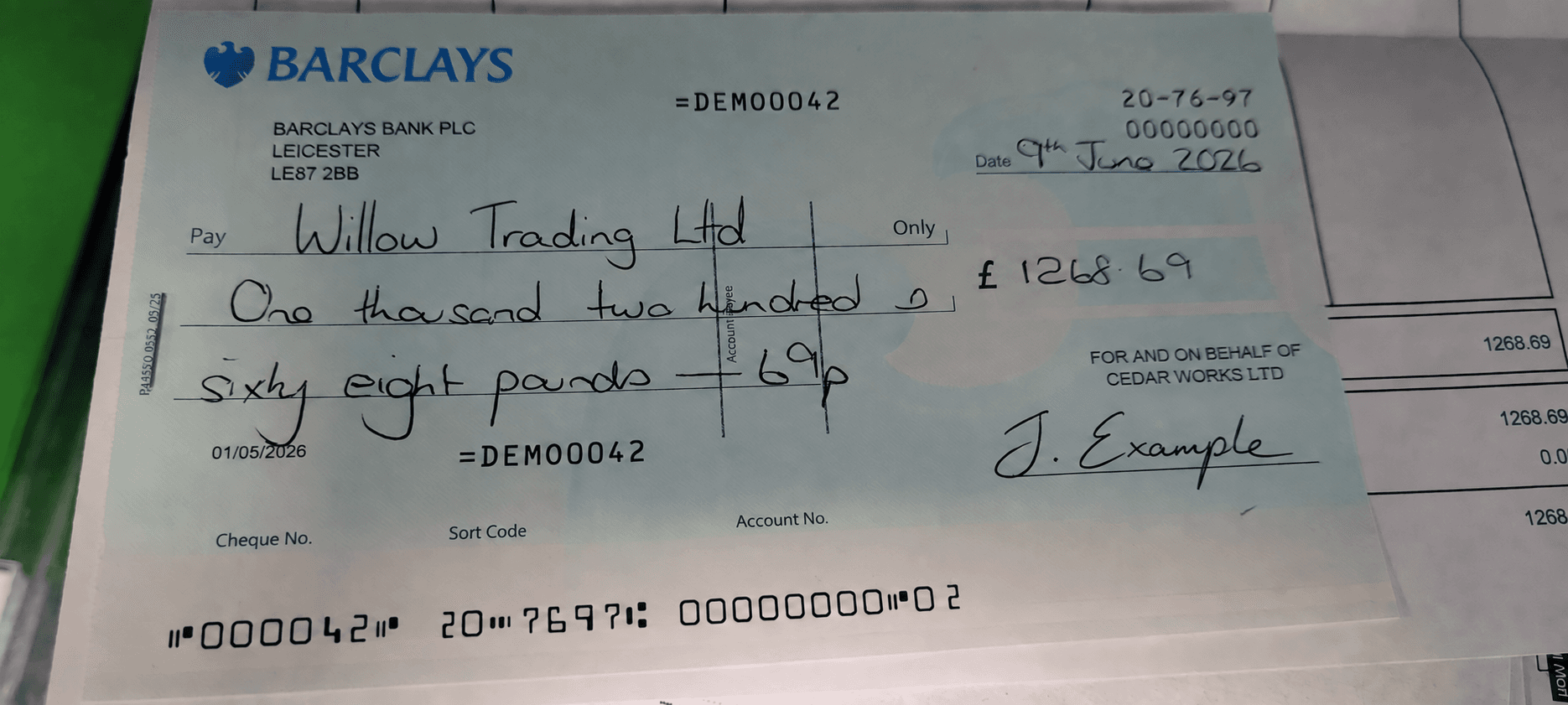
000042 207697 00000000 02MOBILE CAPTURE FLOW
The Chequedb mobile SDK guides the camera inside your app, or your own capture screens can do the same job. Extraction runs from your backend, so the app never holds API credentials and the image that reaches the reader is the image a reviewer sees.
Show a visible frame and ask for a flat surface with a plain, contrasting background. Collect the back image when the bank requires an endorsement.
Preview the image and check for all four corners, glare and blur. Ask for a new capture before the customer leaves the screen. A poor image is cheaper to fix in the app than in a review queue.
Upload from your backend, then show the extracted date, payee, both amounts and cheque number for confirmation. Send disagreements to a reviewer with the source images attached.
REQUEST WALKTHROUGH
After the customer confirms the capture, the images go to your backend. Your backend submits the front image, keeps the back image and deposit context, and joins the OCR response to its own record.
| Step | What your integration does |
|---|---|
| 1. Capture | The app collects the front image, and the back image where the bank requires it, then sends both to your backend over your own authenticated channel. |
| 2. Record the job | Your backend stores its own deposit identifier, customer session and image references, so a retried upload maps back to the same item instead of creating a second one. |
| 3. Submit | Your backend posts the front image as multipart form data with a Bearer token. |
| 4. Read the response | The response returns date, payee, amount_in_numerals, amount_in_words, bank_name, branch, cheque_number and drawer_name, plus validation.amount_match and validation.post_dated. |
| 5. Route | Clean items continue to the deposit workflow. An amount mismatch, an unreadable field or a post-dated cheque goes to a reviewer with the images and a reason code. |
curl --fail-with-body --request POST \
  "${CHEQUEDB_BASE_URL}/api/v1/ocr/cheque/upload" \
  --header "Authorization: Bearer ${CHEQUEDB_TOKEN}" \
  --form "file=@./captures/deposit-7611-front.jpg"
The service URL, authentication scheme and enabled fields are provisioned for your deployment. See the cheque API integration guide for the full response example.
IMAGE QUALITY & RECAPTURE
Catch what you can in the app, before upload. When a read still comes back incomplete, record why, so the reviewer knows what went wrong with the capture.
| Defect | What the app should say | What to do next |
|---|---|---|
| Glare on the amount | Move away from direct light and hold the phone flat over the cheque. | If the amount does not read, keep the image and ask for a new capture. |
| Blur or movement | Hold still until the frame confirms the capture. | Reject the image in the app and keep the failed attempt in your own log. |
| Skew or a cropped edge | Keep all four corners inside the frame. | Ask for a new capture rather than accepting a partial cheque. |
| Folded cheque or two documents | Photograph one cheque at a time on a flat surface. | Stop the upload and ask for a new capture. |
| Too dark or too light | Move to brighter light, or turn on the flash. | Recapture. If the item still fails, route it to review with a reason code. |
| Back image from a different cheque | Photograph the back of the same cheque. | Hold the item for a reviewer to compare both sides. |
| Torn, damaged or non-cheque item | Deposit this item at a branch. | Route it to the exception queue with a reason code. |
Agree image formats, upload limits, rejection messages and reviewer reason codes with the bank during the pilot.
PLATFORM & CAPTURE SCOPE
The Chequedb mobile SDK supplies capture components for native iOS and Android apps. Chequedb also provides extraction, validation flags, fraud and forgery checks, and review. Your app owns the screens around capture and the session handling, built against your own backend.
| Application | Plan with your team |
|---|---|
| Native iOS or Android | Camera permissions, minimum OS versions, auto-capture and edge detection, orientation, file size and the upload contract with your backend. |
| Cross-platform application | Framework and camera plugin versions, behaviour on target devices, front and back sequencing, and how a failed capture is retried. |
| Mobile web | Browser camera or file-input behaviour, permission prompts, rotation, recapture on a small screen and large uploads on mobile networks. |
| Processing and review | Hosted or on-premise processing, network timeouts, credential rotation and how unresolved reads reach a reviewer. |
Confirm framework support, OS versions and any supplied integration components with the ChequeDB team before the build starts.
MOBILE, SCANNER, ATM & KIOSK
Mobile deposit is one way a cheque image reaches the bank. The same OCR API and review queue serve every channel, so a cheque read on a phone, a desk scanner, an ATM or a branch kiosk produces the same fields and the same audit record.
| Channel | Who captures | Image source | What to plan |
|---|---|---|---|
| Mobile banking app | Retail or small business customer | Phone camera, guided by the mobile SDK | Image quality guidance, per-item limits, endorsement wording and duplicate checks |
| Desktop scanner (RDC) | Business customer or back office | Scanner driver or SDK with a MICR read head | Device support, batch sizes and MICR-to-OCR comparison |
| Branch teller capture | Teller | Single-feed or two-pocket scanner | Maker-checker, branch cut-off and same-day review |
| ATM and self-service kiosk | Customer at the device | Built-in image and MICR capture | Device integration, exception routing and customer receipts |
Every channel feeds the same validation: amount in words against numerals, post-dated flags, duplicate checks and reason-coded review.
GET READY FOR DEPOSIT
Set eligibility, limits, endorsement requirements and duplicate controls with the bank. Its systems determine acceptance, holds, clearing and funds availability.
Agree per-customer and per-item limits, account rules, item types and cut-off times with the bank. Enforce them before the customer captures, not after.
Where the bank requires a restrictive endorsement, ask for the back image and show the exact wording it specifies. The bank or a reviewer decides what a missing or wrong endorsement means.
Display the availability date, hold reason and notice the bank supplies. The app is often where a customer first sees a hold.
CONTROLS THE BANK OWNS
These are design points for the bank compliance and operations teams. They are not legal advice, and an extraction service does not carry the bank obligations behind them.
US Regulation CC (12 CFR 229.34(f)) gives a remote deposit capture indemnity, which does not apply where the original cheque bore a restrictive indorsement inconsistent with the means of deposit. Record the cheque number, MICR characters, an image hash and the customer, and check the bank duplicate service before an item proceeds.
Banks commonly require wording such as "For mobile deposit only at [bank]" on the back of the cheque, so the paper item is not presented again elsewhere.
Regulation CC (12 CFR 229.12 and 229.13) sets outer availability limits and exception holds, such as new accounts and large deposits. When an exception hold applies, the bank must give notice of the amount, the reason and the availability date.
The FFIEC remote deposit capture guidance covers risk assessment, customer due diligence, authentication, customer education and controls over retained personal information. Expect these points in a bank review of the integration.
The Image Clearing System, fully rolled out in 2019, exchanges cheque images between UK banks. A cheque paid in on a weekday before the bank cut-off is typically available by 23:59 the next weekday.
SECURITY & DATA HANDLING
A cheque image carries a name, an account number and a signature. Treat the capture, the response and the review record as controlled data at every step.
Your backend holds the Bearer token and calls the OCR API. The app authenticates to your own API and never carries a service credential in the binary or client configuration.
Keep the back image and the OCR response in your own controlled store. Remove device copies where the bank process permits, and keep the original so a reviewer sees exactly what was read.
Apply the bank retention period, restrict access by role and keep an audit trail of who viewed, changed, approved or exported an item.
Banks that need images to stay on their own infrastructure can run processing on-premise instead of hosted.
Review on-premise securityBEFORE ROLLOUT
Include the bank layouts, languages and handwriting your team sees every day, captured on the devices you intend to use. Share only images you are authorised to use.
Measure correct reads for each field, amount disagreements and the items that need review. Check response times at your expected volume.
Agree the supported formats, API contract, review rules and data handling before connecting the service to your live workflow.
QUESTIONS & ANSWERS
Yes. Your backend submits the cheque image as a multipart upload to the cheque OCR API, which returns date, payee, both amounts, bank, branch, cheque number and drawer as JSON with validation flags. Deposit submission, funds availability and clearing stay with your banking integration.
Yes. The Chequedb mobile SDK provides capture components for iOS and Android apps: a guided frame, preview and retake, and front and back sequencing. The captured image goes through your backend to the cheque OCR API, so service credentials never sit in the app.
Mobile check deposit lets a customer pay in a cheque by photographing the front and back in a banking app. The app sends the images to the bank, which reads the cheque, applies its deposit rules and decides holds and funds availability. The customer keeps the paper cheque until the bank confirms the deposit.
Chequedb extracts cheque fields with 99%+ accuracy, including handwritten amounts. Every item still carries validation.amount_match and validation.post_dated, so the few disagreements that remain go to a reviewer instead of straight through.
Yes. Add the capture screens to your current app and route uploads through your existing backend. Agree platform support, image inputs and the processing contract with the ChequeDB team.
No. Keep the token on your backend. The app sends the image to your own authenticated API, which calls the OCR service and returns the fields the customer needs to confirm.
Send the front image to the API. Collect the back image where the bank requires an endorsement, and keep it with the deposit identifier in your own record so a reviewer can see every source.
The response returns both values with validation.amount_match, so the disagreement is visible before the item proceeds. Route it to a reviewer with the source image and record a reason code rather than overwriting the value.
Yes. The reader returns handwritten amounts in words and numerals, payee and date, including colloquial wording and lakh or crore amounts. A read is not an acceptance decision.
Record the cheque number, MICR characters and customer for each item, check them against the bank duplicate service, and require the endorsement the bank specifies. The bank sets the duplicate rules and owns the liability.
No. Recognition is one step. The bank systems and policies determine eligibility, acceptance, holds, clearing and funds availability.
Yes. Field checks flag altered amounts and dates, duplicate checks catch the same cheque presented twice, and forgery detection compares the signature region with authorised references. Include a readable signature region in the capture and route unresolved checks to review.
Yes. ATMs and self-service kiosks submit cheque images to the same OCR API and review queue as the mobile app, so every channel produces the same fields, validation flags and audit record.
The bank decides. In the United States, Regulation CC sets outer availability limits and allows exception holds for new accounts and large deposits. In the United Kingdom, the Image Clearing System typically makes a weekday deposit made before the cut-off available by 23:59 the next weekday.
BUILD WITH CHEQUEDB
Tell us about your app, cheque layouts and required fields. Let’s plan an evaluation with your documents.