Corporate cheque scanner software should do more than save an image. It should read the cheque, flag uncertain fields, and create a structured record. Finance teams can then search, review, reconcile, and send that record into existing systems.
What handwriting recognition changes for corporate teams
Without cheque handwriting recognition and structured data extraction, a digital scanner can still leave a manual process behind it. An operator opens the image, reads the payee and amount, types the data into an ERP, and checks that the words match the figures. At higher volumes, this work moves into spreadsheets, shared folders, and local rules that are difficult to supervise.
Recognising handwriting at capture changes the operating model:
- Accounts receivable can receive structured payer, payee, amount, date, and cheque-number data.
- Treasury teams can combine batches from several sites without re-keying every item.
- Mailroom and back-office staff can focus on exceptions instead of typing every cheque.
- Reviewers can use a managed cheque workflow to see the original image beside the extracted value and its confidence signal.
- Approved records can move through a bank check OCR API while retaining the capture source, corrections, decisions, and export history.
Handwriting recognition should not be sold as automatic certainty. Image quality, writing style, cheque layout, and field complexity all affect performance. A responsible rollout uses representative customer cheques, measures field-level results, and sets review thresholds according to the cost of a wrong value.
See the complete path with your own cheque mix. Book a corporate cheque-processing demo to test printed and handwritten fields, exception review, and the structured record your ERP or treasury system would receive.
That distinction matters. Many scanner and document-capture products are strongest at device control, MICR capture, and machine-printed text. They move an image from the scanner into an application. Handwritten payee names, dates, numeric amounts, and legal amounts often still need manual entry or a separate recognition layer.
Chequedb handles those handwritten fields as well as printed content. It sits above the scanner capture layer. A corporate team can keep the scanner driver, OEM SDK, or middleware that fits its hardware estate. Chequedb then applies cheque-specific recognition, validation, exception handling, and integration.
In short: scanner middleware moves cheque images. Chequedb turns them into validated, searchable, audit-ready records.
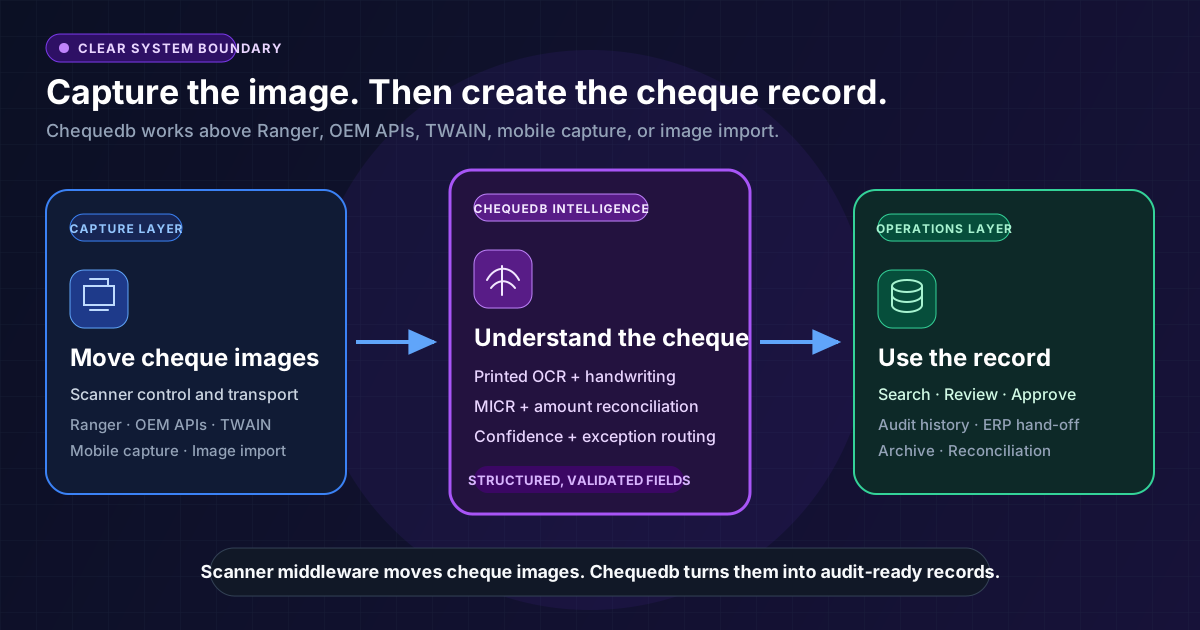
The capture layer keeps control of the scanner. Chequedb adds handwriting recognition, validation, review, and downstream integration.
Why scanner control is only the first step
A cheque scanner and its software must handle feeding, front and rear images, MICR data, image quality, jams, endorsements, and device state. That work matters, especially when a business uses different scanner models across offices or processing centres.
But capture does not answer the questions a corporate finance team faces next:
- Who is the cheque payable to?
- What amount is written in figures?
- Does the amount in words agree?
- Is the date valid under company policy?
- Is the cheque a possible duplicate?
- Can the record be matched to a customer, invoice, account, or deposit batch?
- Which fields are safe to accept, and which need review?
This is why cheque scanning software for businesses needs a clear boundary between capture and cheque intelligence. The scanner layer controls the device. Chequedb standardises what happens after capture.
Handwriting is where ordinary OCR falls short
Printed OCR is mature. Clean, machine-printed text has consistent character shapes, spacing, and alignment. Handwritten cheques are different.
A handwritten amount may be cursive, rushed, faint, or partly obscured by a security background. Writers can use different number forms and local amount language. A payee name may cross a printed line. A date may use an unfamiliar order or separator. The amount in words must also be interpreted as a financial value, not returned as an unstructured text string.
The recognition methods have different jobs:
| Method | What it reads | What it does not solve alone |
|---|---|---|
| MICR | The encoded control line, including routing or sort code, account, and cheque number | Handwritten payee, date, and amount fields |
| OCR | Machine-printed text | Unconstrained handwriting and cheque-specific validation |
| ICR or handwriting recognition | Handwritten amounts, dates, payee names, and other selected fields | Business rules, reconciliation, review, and posting by itself |
Chequedb combines these methods in a field-aware pipeline. It locates each relevant cheque field, applies the right recognition method, normalises the value, and returns confidence signals. It can compare the courtesy amount in figures with the legal amount in words. If a read is unclear or conflicting, the item can go to a human review queue instead of being treated as certain.
This is the practical difference between generic document OCR and cheque data extraction. Generic OCR returns characters. Cheque-specific processing returns financial fields with context, validation, and a controlled path for uncertainty.
Easy integration starts with a clean boundary
Easy integration does not mean pretending that every scanner, ERP, and treasury workflow is identical. It means keeping the interface between them small and predictable.
For a typical corporate deployment, the flow is:
Cheque scanner
  -> scanner driver, OEM SDK, or capture middleware
  -> front and rear images, MICR, device and batch metadata
  -> Chequedb recognition, validation, and review
  -> approved record through API, webhook, or agreed export
  -> ERP, accounts receivable, treasury, archive, or payment workflow
This approach offers three practical advantages.
Keep the capture hardware that fits each site
Chequedb is hardware-agnostic at the processing layer. Existing scanner software can continue to control feeding, pocketing, endorsement, and device-specific functions. Chequedb accepts the resulting images and available metadata, then applies one downstream recognition and validation model.
Direct compatibility still depends on the scanner model, driver, operating system, and deployment. A representative pilot confirms the exact path before rollout. The benefit is that a business does not have to replace a useful scanner estate just to improve the intelligence layer.
Send one structured record downstream
Corporate systems should not have to interpret raw OCR text. Chequedb can return field values, confidence signals, validation results, review reasons, and workflow status. That gives an integration team a stable record to map into an ERP, accounts-receivable platform, treasury system, or archive.
The bank check OCR API supports this model with structured output and workflow events. Accepted items can move downstream. Low-confidence handwriting or amount mismatches can remain in review until resolved.
Add controls without rebuilding the scanner layer
Because capture and processing are separate, a team can add amount reconciliation, duplicate checks, date-policy rules, review queues, search, and audit history without rewriting the device integration. The same processing model can serve desktop scanners, production batches, file imports, and approved API feeds.
After extraction, the cheque management workflow can control review, approvals, reconciliation, status tracking, and audit evidence.
What corporate buyers should test
A product demonstration should use the organisation's real cheque mix, not a folder of clean vendor samples. The test set should include printed and handwritten items, different issuers, poor images, stamps, folds, varied layouts, and the amount language used in the target market.
Ask each vendor to show:
- Field-level results for printed and handwritten payee, amount, and date fields.
- What happens when the amount in words conflicts with the numeric amount.
- How low-confidence handwriting is routed and corrected.
- Whether the original value, corrected value, reviewer, and timestamp remain traceable.
- How images and metadata move from each target scanner into the processing layer.
- The exact API, webhook, or export record delivered to downstream systems.
- How retries avoid duplicate posting and preserve batch control totals.
- Which parts can run in customer-controlled infrastructure when data residency matters.
Avoid a single headline accuracy percentage. Handwritten payee recognition and MICR reading are different tasks with different risks. The useful measures are exact field match, false acceptance, exception rate, and the time required to resolve an uncertain item.
A better outcome from the scanners already in place
Corporate teams do not always need another scanner abstraction or a complete replacement of the capture estate. They need the images produced by those scanners to become useful financial records.
Chequedb adds the layer that many capture products leave to manual work: cheque-specific handwriting recognition, amount reconciliation, confidence-led review, searchable records, and connections to the systems finance teams already use.
That makes integration simpler and the result more valuable. Keep the scanner layer that fits the hardware. Add one recognition and workflow model above it. Then validate the complete path with real cheques before rollout.
For the capture and hardware model, review cheque scanning software for businesses. For API-led integration, see the bank check OCR API. If cheque images must remain inside customer-controlled infrastructure, review on-premise cheque processing.
Book a demo with your own cheque mix to validate handwriting recognition, exception handling, and the downstream ERP or treasury record before planning a rollout.
Frequently Asked Questions
Can Chequedb work with our existing cheque scanners?
Yes at the processing layer. The existing driver, OEM SDK, or scanner middleware can continue to control the device and provide front and rear images, MICR data, and available capture metadata. Chequedb applies recognition, validation, review, and export after capture. Exact scanner and operating-system compatibility is confirmed in a pilot.
Can Chequedb read both printed and handwritten cheques?
Yes. Printed fields use OCR, handwritten fields use cheque-specific ICR or handwriting recognition, and the codeline uses MICR methods. Each extracted field can carry a confidence signal so uncertain values are reviewed rather than accepted automatically.
Why is handwriting recognition important if the scanner already reads MICR?
MICR normally covers the control line at the bottom of the cheque. It does not read the handwritten payee, date, numeric amount, or legal amount in words. Corporate processing needs both the control data and the visible payment instructions.
How does Chequedb integrate with an ERP or treasury system?
Approved cheque records can be delivered through APIs, webhooks, or agreed export formats. The downstream record can include extracted fields, confidence signals, validation results, review status, source metadata, and audit history. Exact mappings and posting controls are agreed for the target system.
What happens when the handwriting cannot be read confidently?
The item can be routed to a review queue with the original cheque image, the extracted value, and the reason for review. Corrections and approval decisions can remain attached to the cheque record for later search and audit.