Yes. Cheque OCR can run inside your own infrastructure and read both printed and handwritten fields.
Printed text and handwriting are different recognition problems. Standard OCR handles printed text. Handwriting recognition, often called ICR, reads payee names, dates, numeric amounts, and amounts in words. A production system combines both with MICR reading, field validation, confidence scores, and human review.
That is the difference between storing a cheque image and creating a usable cheque record.
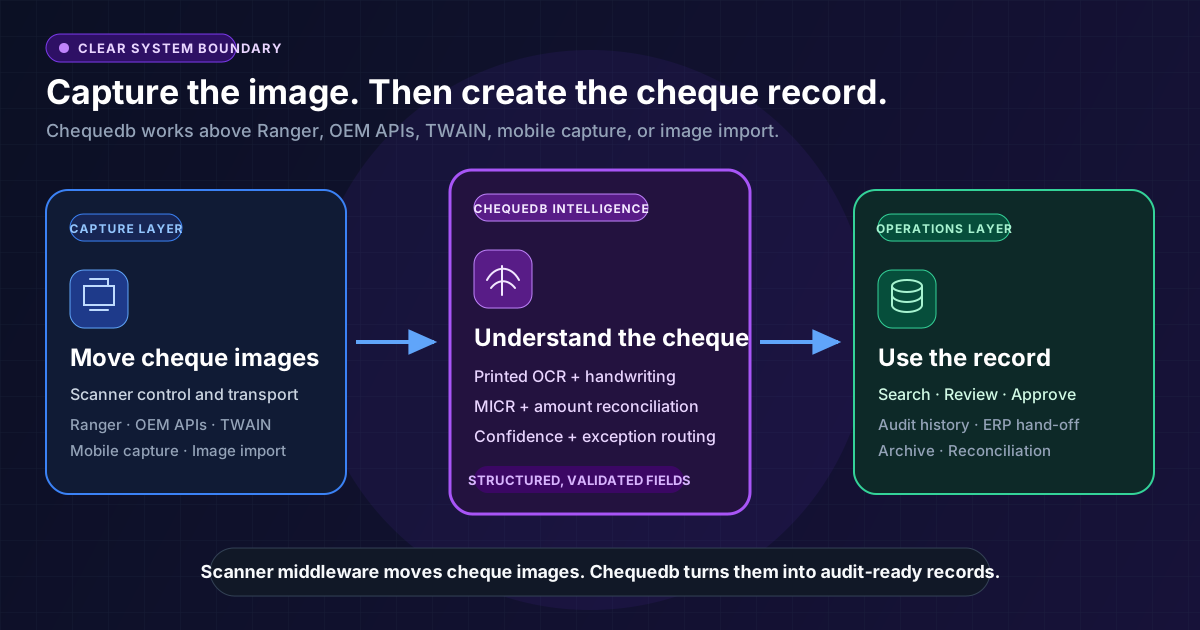
Capture is not recognition
A scanner driver or scanner-middleware layer controls the device. It feeds paper, captures front and rear images, reads MICR data, and reports hardware events.
It does not turn every visible field into validated business data. It does not create a searchable archive, reconcile amounts, or route uncertain reads to review.
An on-premises cheque OCR pipeline begins after capture:
Scanner, mobile camera, or image import
  -> image quality and document normalisation
  -> printed-text OCR
  -> handwriting recognition
  -> MICR and amount reconciliation
  -> confidence-led review
  -> searchable cheque record
  -> ERP, banking, or finance workflow
The capture layer can be an OEM scanner API, TWAIN, scanner middleware, a local capture agent, or a mobile application. The recognition and record layer remains stable above it.
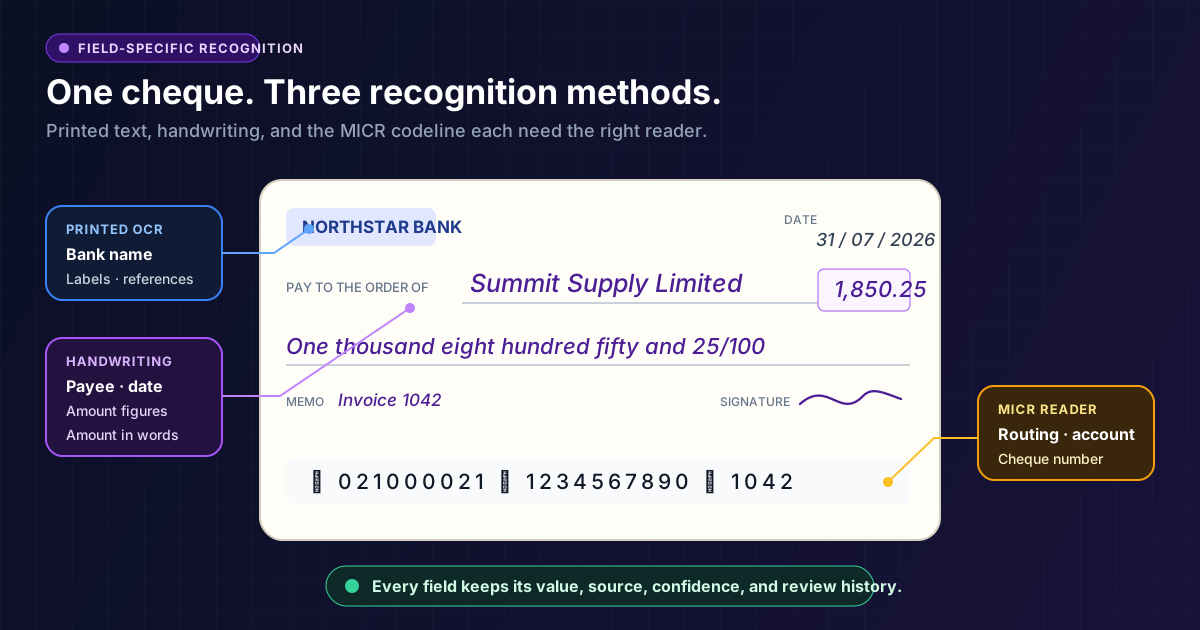
Printed cheque OCR and handwriting recognition
Printed and handwritten fields need different recognition methods.
| Cheque content | Recognition method | Typical examples |
|---|---|---|
| Machine-printed text | OCR | Bank name, account-holder details, printed date stamps, reference text |
| Handwritten text | ICR or handwriting recognition | Payee, date, memo, amount in figures, amount in words |
| Magnetic codeline | MICR reader, with optical validation where needed | Routing or sort code, account number, cheque number |
| Amount comparison | CAR/LAR reconciliation | Numeric amount compared with the amount written in words |
The hard part is not character detection. Cheque handwriting is short, variable, and financially sensitive. A rushed payee name gives little context. The written amount may contain cursive text, abbreviations, regional number terms, or a mix of words and figures.
Preserve uncertainty. Low-confidence fields should never be silently accepted. Route them to review with the original image crop, the extracted value, and the reason review is required.
For field coverage, see cheque data extraction for OCR, MICR, and validation.
What on-premises changes
Cloud OCR sends images to an external service. On-premises deployment keeps recognition, models, records, and review within customer-controlled infrastructure.
That matters because cheque images contain:
- account and routing details;
- payee and payer names;
- signatures and endorsements;
- payment amounts and dates;
- handwritten notes or references;
- a record of commercial relationships.
On-premises deployment gives control over network boundaries, storage location, access policies, retention, model updates, and integration with internal systems. The topology varies from customer-managed servers to private cloud.
The procurement question is not simply, "Is it on-prem?" It is:
Which parts of capture, recognition, storage, search, review, and model operation remain inside the controlled environment?
The answer must be explicit. A local database with cloud OCR is not a fully on-premises recognition pipeline.
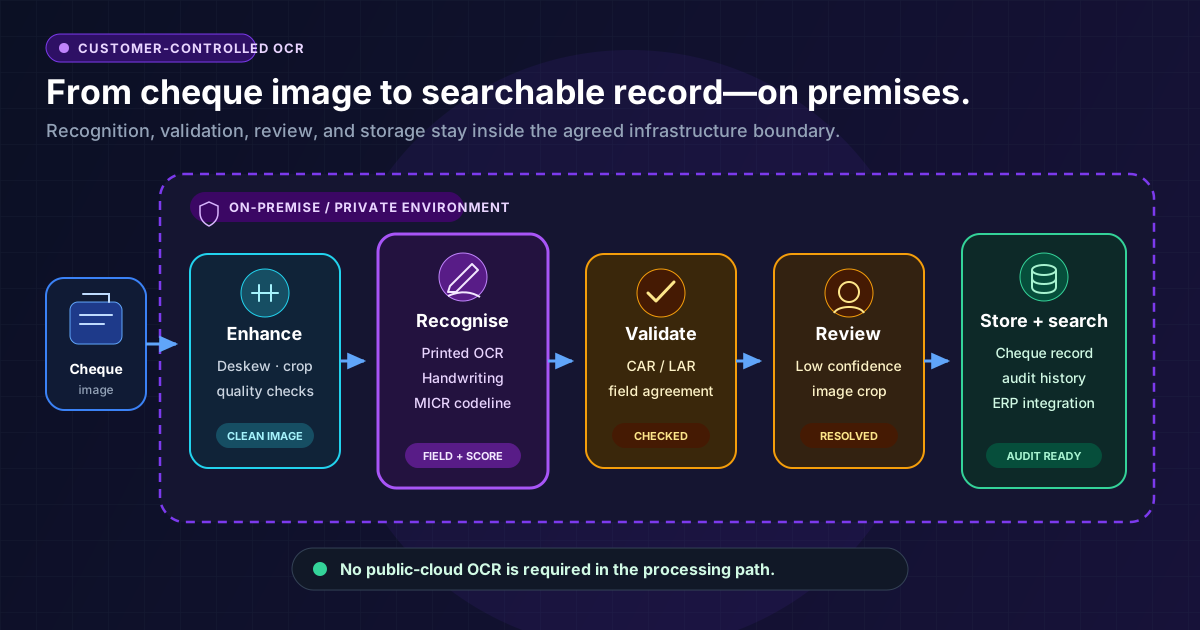
See the on-premise cheque OCR and processing platform for the deployment model and system boundary.
Search depends on structured extraction
A folder of cheque images is not a searchable cheque database.
Search starts when the system turns the image into indexed fields linked to workflow history. Teams should be able to search for:
- a payee or drawer, including a name read from handwriting;
- an amount or amount range;
- cheque number, account number, or routing detail;
- issue, receipt, deposit, or return date;
- low-confidence and corrected fields;
- amount mismatches or other exceptions;
- approval, rejection, and override activity;
- links to invoices, ledger entries, customers, or projects.
The original image remains evidence. The extracted fields make it discoverable. Review and audit history show how the final record was produced.
That is why handwriting recognition matters beyond data entry. If handwritten content cannot be extracted and reviewed, many useful search fields remain trapped inside the image.
Explore how this works in a searchable cheque archive.
What a production system should return
A useful result is not a block of raw text. It is structured output that preserves both the value and the system's confidence in that value.
{
  "payee": {
    "value": "Summit Supply Limited",
    "source": "handwriting",
    "confidence": 0.88,
    "review_required": true
  },
  "amount": {
    "courtesy": "1850.25",
    "legal": "one thousand eight hundred fifty and 25/100",
    "match": true
  },
  "micr": {
    "routing_number": "021000021",
    "account_number": "1234567890",
    "cheque_number": "1042"
  }
}
The exact schema will vary, but the principles should not:
- Keep fields separate.
- Record how each field was read.
- Return field-level confidence.
- Cross-check values that should agree.
- Route uncertainty instead of hiding it.
- Preserve the image and every correction.
See the bank check OCR API for structured output and integration patterns.
How to evaluate handwritten cheque OCR on premises
Test the deployment and the recognition engine separately.
For recognition, use a blind dataset of printed and handwritten cheques: different layouts, poor images, regional number formats, cursive writing, and difficult payee names. Measure exact field matches, false accepts, review rates, and CAR/LAR agreement. Do not accept one document-level accuracy percentage.
For deployment, confirm:
- whether recognition makes any external API calls;
- where images, extracted fields, logs, and backups are stored;
- how users and services authenticate;
- how models and software are updated;
- whether updates can be staged and rolled back;
- how retention and deletion are controlled;
- how scanner, mobile, API, ERP, and archive integrations cross the network boundary;
- what evidence is recorded when a human corrects a field.
The proof of concept must include real handwriting and real exceptions. A demo using clean printed cheques does not test the difficult part.
The practical distinction
Scanner middleware moves cheque images.
On-premises cheque OCR reads the printed and handwritten content. Chequedb turns those readings into structured, searchable records with validation, review, and audit evidence.
The layers can work together. The mistake is treating capture as if it completes the job.
Frequently Asked Questions
Can on-premise OCR read handwriting?
Yes, when the deployment includes handwriting recognition or ICR models. Standard printed-text OCR alone cannot read handwritten payee names, dates, memos, or amounts in words.
Does Chequedb read printed cheque fields too?
Yes. Printed fields use OCR, handwritten fields use cheque-specific handwriting recognition, and the codeline uses MICR or optical MICR. The results are validated and stored as one cheque record.
Does on-premise cheque OCR need internet access?
The recognition pipeline can run inside customer-controlled infrastructure. Connectivity depends on the deployment topology, integrations, support process, and update method. Document these boundaries during implementation.
What makes extracted cheque data searchable?
The system indexes structured fields such as payee, amount, date, cheque number, status, exception, and linked accounting record. It connects them to the original image and review history.
Is handwriting recognition always automatic?
No. Unclear handwriting should produce a low confidence score and enter a review queue. The goal is to automate confident reads and make uncertain ones easy to resolve.