Read printed and handwritten cheques inside your own infrastructure
Run OCR, handwriting recognition, validation, search, and review on infrastructure you control. Turn captured cheque images into structured, searchable records without making public-cloud OCR part of the processing path.
Printed fields use OCR. Handwritten fields use cheque-specific handwriting recognition. MICR handles the codeline. Confidence and review connect the results. For the cross-deployment operating model, review the cheque processing software capabilities.
Scanner software captures the image. Chequedb creates the record.
Keep the capture layer that fits your scanner estate. Chequedb reads the image, cross-checks the fields, routes uncertainty, and stores the result with audit history.
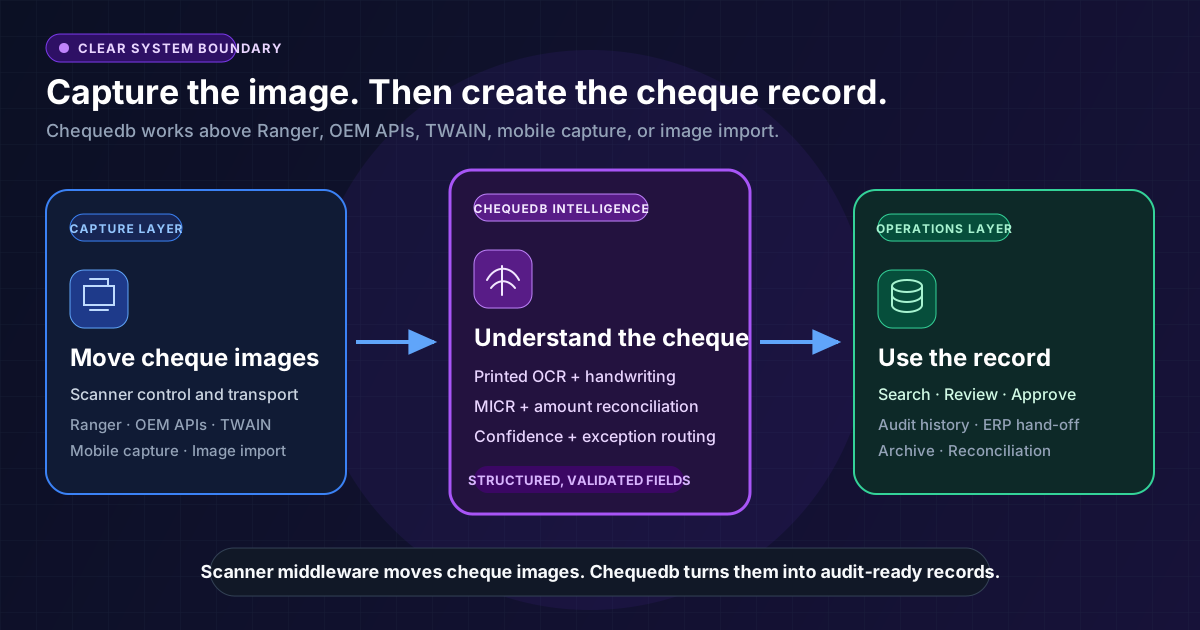
Capture layer
OEM APIs, TWAIN, scanner middleware, mobile capture, or image import provide the front and rear cheque images.
Cheque intelligence layer
Printed OCR, handwriting recognition, MICR, amount reconciliation, confidence scoring, and image-quality checks create structured fields.
Operations layer
Search, review, approvals, corrections, ERP hand-off, and audit evidence turn extracted fields into controlled work.
Handwriting is a first-class input, not an edge case
Printed text is the straightforward part. Cheques also carry cursive payee names, handwritten dates, numeric amounts, and legal amounts in words. Chequedb applies field-specific recognition and returns confidence for each result.
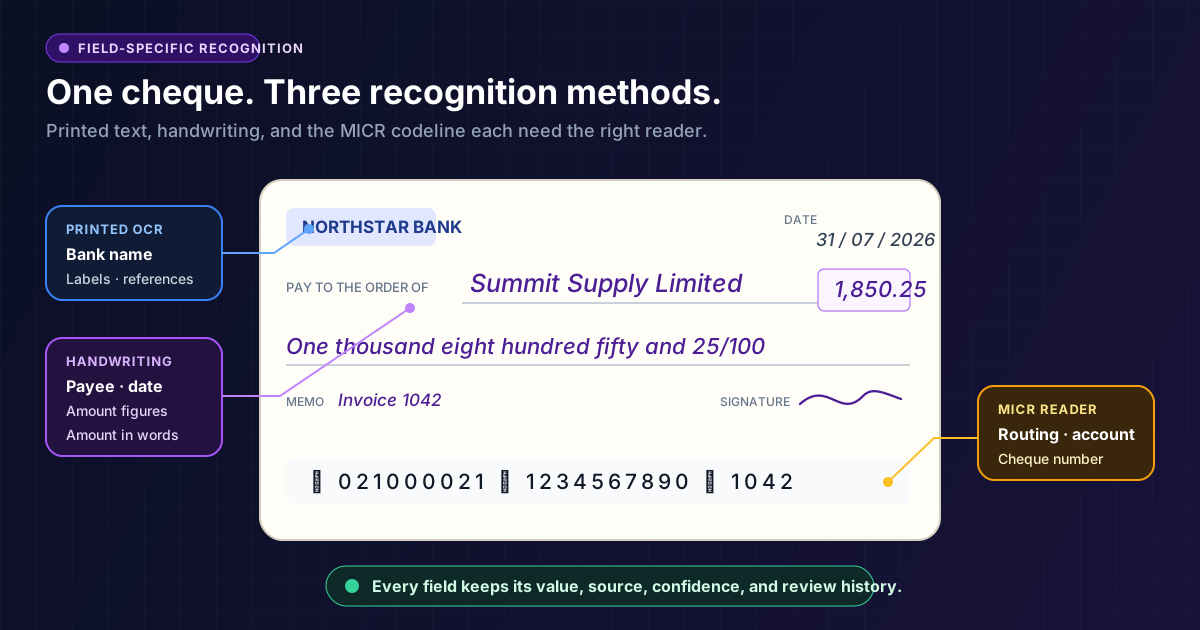
Printed OCR
Handwriting recognition
Amount reconciliation
Confidence-led review
Search the content of every cheque
Image folders hold files. Chequedb indexes what is on them. Search by payee, amount, date, cheque number, account detail, status, exception, linked invoice, or reviewer action.
The record keeps the source image, extracted fields, corrections, and workflow history together.
Explore Searchable ArchiveExample record searches
Search extracted fields and workflow state
Keep recognition, records, and review under your control
Deploy cheque-processing services and data stores inside infrastructure your organisation controls. Define the network boundary, storage location, user access, retention, integration paths, and software update policy for the deployment.
Exact topology, connectivity, and operational responsibilities are agreed for each deployment.
Your infrastructure boundary
Processing and records stay together
From captured image to audit-ready record
Each stage keeps the original evidence connected to the extracted value and the final decision.
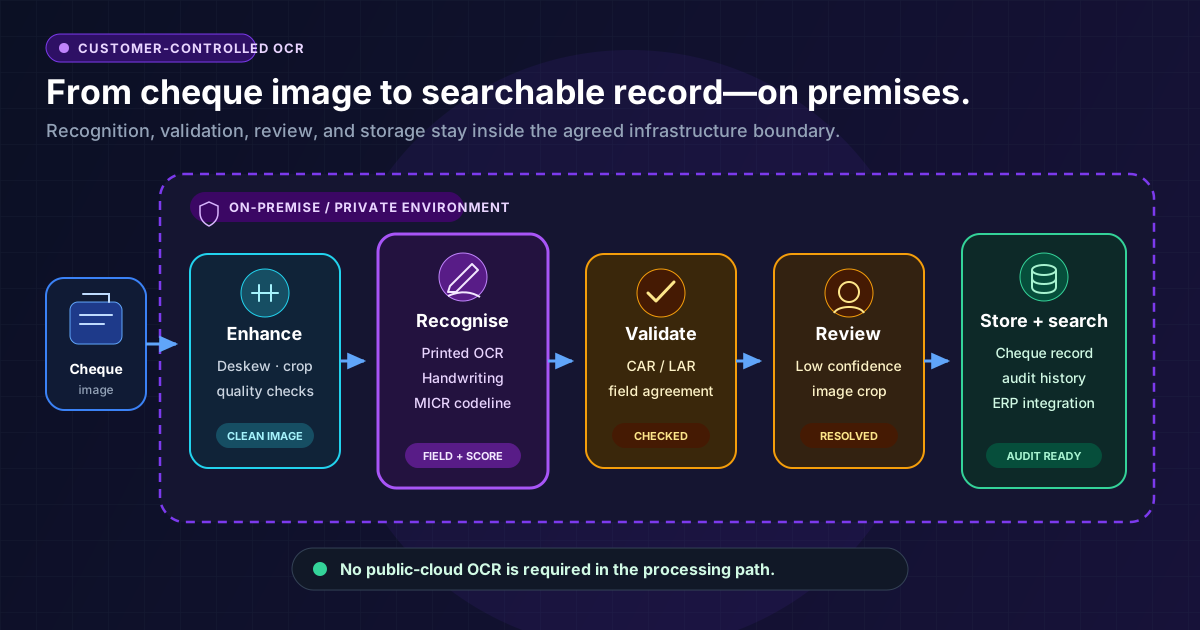
Accept front and rear images from a scanner, camera, or image-import workflow.
Apply MICR, printed OCR, and handwriting recognition to the appropriate fields.
Check image quality, confidence, amounts, dates, and field agreement.
Route uncertain fields with the relevant image crop and reason code.
Store the resolved record and send approved data to internal systems.
Frequently Asked Questions
Can Chequedb read printed and handwritten cheques?
Can Chequedb read printed and handwritten cheques?
What remains on premises?
What remains on premises?
Does Chequedb replace scanner middleware?
Does Chequedb replace scanner middleware?
What can users search?
What can users search?
What happens when handwriting is unclear?
What happens when handwriting is unclear?
Keep cheque intelligence inside your infrastructure
See Chequedb read printed and handwritten cheques, create searchable records, and route uncertain fields without depending on public-cloud OCR.