01
Read handwritten amounts
Extract the amount in words and the numerals in the amount box. Compare both reads to help catch disagreements before the cheque moves on.
CHEQUEDB FOR DEVELOPERS
Turn a cheque photo into structured data. Read handwritten amounts in words and numerals, combine cheque fields with MICR details, and get validation scores for your approval or deposit workflow.
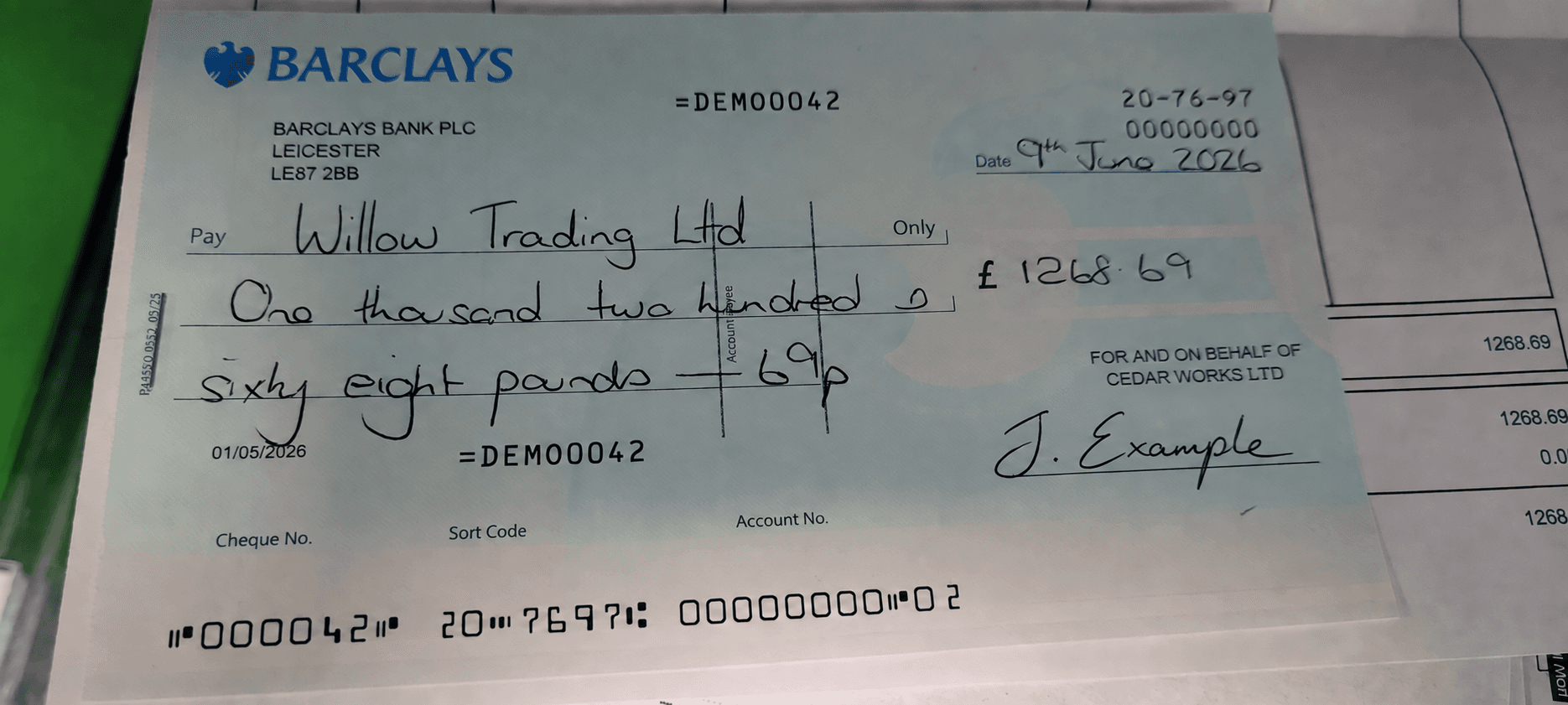
000042 207697 00000000 02CHEQUE DATA CAPTURE
Read handwritten amounts and printed cheque fields from a phone photo or scanned image. Combine them with MICR routing, account and cheque details for your approval or deposit workflow.
Extract the amount in words and the numerals in the amount box. Compare both reads to help catch disagreements before the cheque moves on.
Capture payee, date, bank, branch, cheque number and drawer alongside both amounts. Combine these fields with MICR routing and account details in your application.
Use the source image and extracted values together. Give your team the information they need to resolve a missing field or unclear read.
INTEGRATION OPTIONS
Start with the guide that fits your application.
Submit a cheque image and receive structured fields for your application. Read handwritten amounts, payee names and dates.
Explore the OCR APIConnect image uploads, map the JSON response and handle requests that need a retry or review.
Read the integration guideConnect images and device reads from your scanner’s driver or vendor SDK to cheque processing.
Explore scanner integrationLet customers photograph a cheque in your banking app. Connect capture, OCR and review to your bank’s deposit process.
Explore mobile captureFind signatures in scanned documents and compare them with authorised references. Available for beta evaluation.
Explore SignaturesConnect extracted data to cheque tracking, approvals and a searchable archive for your operations team.
Explore cheque managementGET STARTED
Upload a cheque to the online OCR and date tool to see image extraction in action. The tool processes your upload on a server.
Try the online toolSee the image upload example and response fields. Discuss API access, hosting and platform requirements with our team.
Read the integration guideEvaluate the handwriting, bank layouts and capture conditions your users will submit. Agree the results you need before rollout.
Contact salesQUESTIONS & ANSWERS
Yes. ChequeDB extracts amounts in words and numerals, alongside payee, date and printed cheque fields. Test the handwriting, languages and layouts you use to establish field accuracy and review requirements.
Build the mobile SDK integration around your app’s capture and review flow. Let customers photograph the cheque, preview or retake it, and review prefilled handwritten amounts, payee, date and MICR details before continuing to deposit. Confirm platform support, capture components and processing requirements with our team.
For iOS and Android, plan camera permissions, cheque framing, preview and retake in your app. For web, use browser camera capture or image upload. Connect the capture flow to OCR through your application backend and display the returned fields for review. Confirm SDK components, framework support and OS or browser versions with our team.
Connect captured images and available MICR reads from your scanner’s vendor driver or SDK. Confirm the scanner model, operating system and processing adapter with our team.
Discuss hosted or on-premise OCR processing for your integration. The online tool uses server-side processing. Agree network access, data handling and mobile upload behaviour with our team.
Contact our team to arrange API access and the integration components for your app. Share your mobile framework, target devices and cheque workflow so we can scope the evaluation.
BUILD WITH CHEQUEDB
Tell us about your app, cheque layouts and required fields. Let’s plan an evaluation with your documents.