Check scanner middleware and cheque processing software solve different parts of the same workflow. Middleware helps an application communicate with scanner hardware. Processing software turns the captured images and MICR data into a controlled business item that can be checked, reviewed, approved, exported, reconciled, and searched later.
Confusing the two can leave a project with a working scanner but no reliable exception process—or with capable processing software that cannot operate the scanners already deployed across branches and offices.
This article separates the layers so technical and operations teams can decide what they actually need.
The short answer
A scanner integration normally contains several distinct layers:
- Scanner hardware feeds the cheque, captures images, and may read MICR or control features such as endorsement and output pockets.
- An OEM driver lets the operating system communicate with a particular device family.
- An OEM SDK exposes that manufacturer's scanner controls to an application.
- Universal scanner middleware provides a common interface across multiple scanner brands or models.
- OCR and cheque extraction interpret the captured image and return fields such as amount, payee, date, cheque number, and confidence.
- Cheque processing software manages validation, exceptions, approvals, posting, reconciliation, retention, and audit evidence.
The first four layers primarily answer: How do we acquire a usable image and device data?
The last two answer: What do we do with the cheque after capture?
If you are evaluating the complete capture-to-review path, start with hardware-agnostic cheque scanning software. If you are still choosing physical devices, use the cheque scanner compatibility catalogue separately.
A practical architecture
The boundary becomes clearer when the components are placed in sequence:
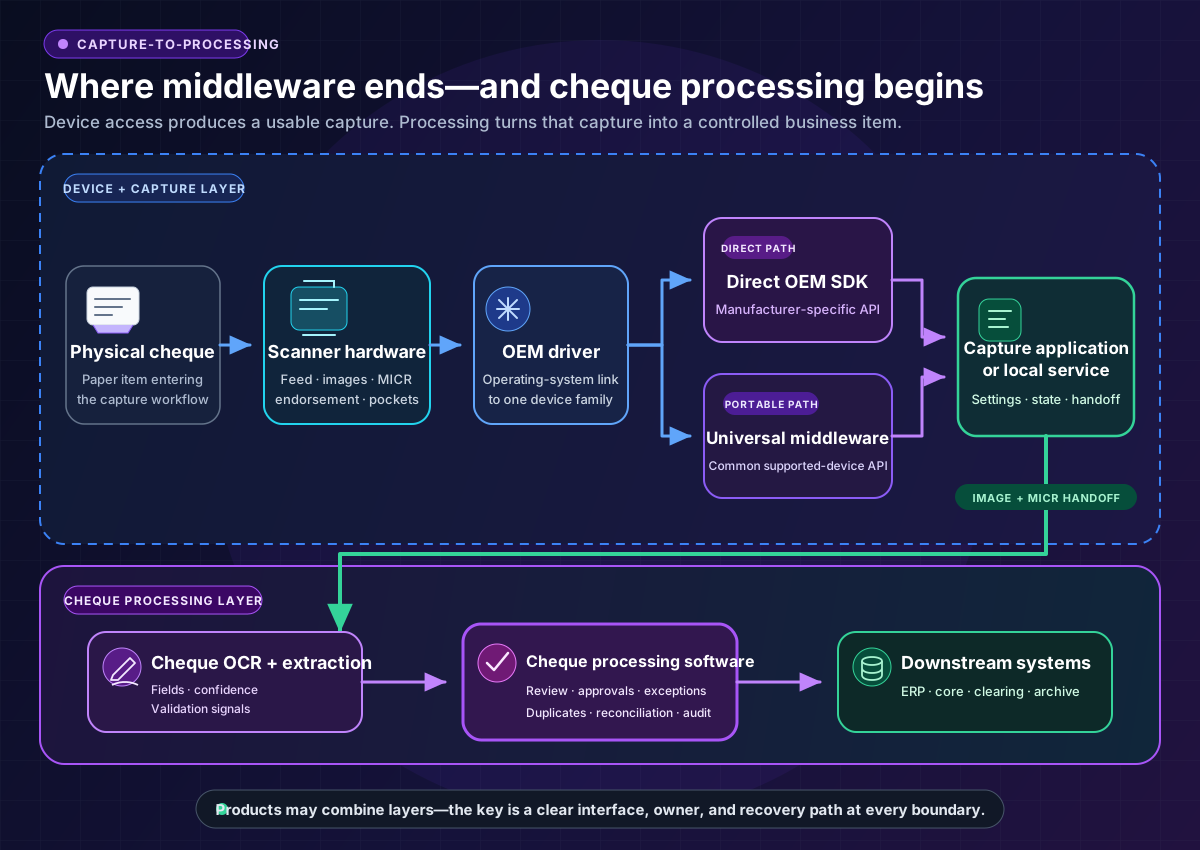
Not every installation needs a separate product at every line. An OEM SDK may include a driver. Middleware may bundle a local service. Processing software may include OCR. The procurement question is not how many products are present; it is whether ownership and failure handling are clear at every boundary.
What each layer does—and does not do
| Layer | Primary responsibility | Typical outputs | What it usually does not provide alone |
|---|---|---|---|
| Scanner hardware | Move and image the paper item | Front/back image, device status, sometimes MICR | Business validation, approval workflow, reconciliation |
| OEM driver | Connect one device family to the operating system | Device availability and low-level communication | A stable application interface across multiple manufacturers |
| OEM SDK | Expose manufacturer-specific controls | Feed commands, image settings, events, endorsement and pocket controls | Portability to other scanner brands; downstream cheque workflow |
| Universal middleware | Normalize supported scanner interfaces | Common capture commands, normalized events, image and MICR handoff | Cheque-specific OCR, accounting logic, clearing, or complete case management unless explicitly included |
| OCR and extraction | Interpret cheque images and machine-readable data | Structured fields, confidence scores, quality or mismatch signals | Human approval, posting, reconciliation, or retention policy |
| Cheque processing software | Control the item lifecycle after capture | Review state, validated record, approvals, exports, reconciliation and audit evidence | Direct control of every physical scanner unless an SDK or middleware layer is included |
Product names can blur these boundaries. A vendor may call an SDK “software,” a local capture service “middleware,” or an OCR endpoint a “processing platform.” Ask for a component diagram and data flow rather than relying on category labels.
Scanner drivers and OEM SDKs
An OEM driver handles the operating-system relationship with a particular scanner. The SDK gives application developers a supported way to use device capabilities such as:
- starting and stopping a feed;
- selecting image colour, resolution, crop, or compression settings;
- receiving front and back images;
- reading MICR data when the device and SDK expose it;
- controlling endorsement or output pockets where supported;
- reacting to hopper-empty, double-feed, jam, cover-open, or transport errors.
A direct OEM SDK can be the simplest choice when an organisation controls a small, standardised fleet. It can offer a shorter support chain and early access to device-specific features.
The tradeoff is coupling. Replacing the scanner family may require new integration work, a different event model, fresh regression testing, and changes to deployment packages. That cost is easy to underestimate when the first proof of concept uses only one scanner on one workstation.
What universal scanner middleware adds
Universal middleware sits between the application and supported OEM integrations. Its value is a common capture contract: the application can use the same high-level operations while adapters handle device-specific details.
That can be useful when:
- branches already own scanners from several manufacturers;
- models will be replaced over time without changing the host application;
- an independent software vendor cannot dictate its customers' hardware;
- capture behaviour and device errors need to be normalised;
- the team wants one certification boundary for a wider device estate.
Middleware does not eliminate device differences. One scanner may have two output pockets while another has one. Endorsement, MICR, double-feed detection, image formats, and recovery behaviour can vary. A sound middleware design exposes a capability model and, when necessary, a controlled manufacturer-specific pass-through.
Pass-through is useful, but every pass-through call reduces portability. Keep those calls isolated behind named capabilities so device-specific assumptions do not spread through the business application.
Standards can also provide an acquisition abstraction. The TWAIN Working Group describes TWAIN as a public standard linking applications and image-acquisition devices. That is still an acquisition boundary: using a standard interface does not by itself provide cheque validation, approval queues, reconciliation, or posting.
Why capture is not cheque processing
A successful scan proves that the application received data from a device. It does not prove that the cheque is ready for a deposit, ledger entry, or business decision.
Downstream software still needs to answer questions such as:
- Is the image complete, readable, correctly oriented, and associated with the right item?
- Did MICR and OCR produce plausible values, and which fields need review?
- Do the numeric and written amounts agree?
- Has the same item already entered through another channel?
- Who may correct a field, and who must independently approve the correction?
- Was the item accepted by the downstream system or bank?
- Do item counts and value totals reconcile at each handoff?
- Can an auditor reconstruct the original capture, changes, approvals, exports, and final outcome?
This is the role of processing software. For systems that need structured recognition results, confidence, and validation signals, review the bank check OCR API. For the post-capture operating model, see cheque review, approval, reconciliation, and audit workflows.
Direct OEM SDK or universal middleware?
Neither approach is automatically better. The right choice depends on the scanner estate and who owns its lifecycle.
A direct OEM SDK is often suitable when
- the organisation controls and standardises the scanner model;
- scanner-specific functions are operationally important;
- the deployment team can package and update the OEM components;
- a hardware change is rare and can be treated as a planned integration project;
- the team wants the shortest possible route to manufacturer support.
Universal middleware is often suitable when
- several scanner brands or models must be supported;
- hardware choices belong to customers, branches, or regional teams;
- the application should remain stable when devices change;
- consistent state, events, and error handling matter more than exposing every device feature directly;
- the cost of certifying and maintaining multiple OEM integrations would exceed the middleware cost.
Use both deliberately
A common design uses middleware for portable capture and an isolated OEM-specific adapter for the small number of capabilities that cannot be normalised. Document those exceptions because they are the real switching cost.
Browser-based capture needs an explicit local boundary
A browser application often cannot control a USB cheque scanner using ordinary web requests alone. A practical design may use a locally installed service, a signed desktop component, a browser extension, or a network-accessible scanner interface.
That local boundary is part of the production architecture, not a minor installation detail. Evaluate:
- how the browser authenticates the local service;
- which origins may send scanner commands;
- whether transport is encrypted where appropriate;
- how packages are signed, updated, rolled back, and removed;
- what happens when the browser, local service, driver, and firmware versions drift;
- whether the service exposes only the minimum required device operations;
- how support teams collect diagnostics without exposing cheque images or account data.
A browser demo that scans one item is not enough. Test the installation, upgrade, recovery, and security lifecycle as carefully as image capture.
Define the handoff contract before choosing products
The most important interface is the contract between capture and processing. Define it before comparing vendors or building adapters.
At minimum, decide how the system represents:
- a stable item and batch identifier;
- front and back images, formats, and checksums;
- raw and parsed MICR;
- scanner make, model, firmware, and capture settings;
- timestamps and workstation or location identifiers;
- capture warnings and hardware events;
- OCR field values and confidence;
- rescan, correction, rejection, and duplicate relationships;
- acknowledgement and reconciliation status.
The processing system should be able to reject an incomplete handoff without losing traceability. Retries should be idempotent: resending the same captured item must not silently create a second business item.
Scanner compatibility and pilot checklist
Use the pilot to validate the whole operating path, not only whether the scanner light turns on.
Estate and deployment
- Inventory scanner manufacturer, model, firmware, connection type, location, and expected replacement cycle.
- Record workstation operating system, processor architecture, browser, and managed-device constraints.
- Identify every required driver, runtime, local service, certificate, and licence.
- Test clean installation, upgrade, rollback, offline recovery, and removal.
- Confirm who owns support when a failure crosses hardware, driver, middleware, network, and application boundaries.
Device capabilities
- Verify front and back image capture with the required resolution, colour mode, crop, and compression.
- Verify magnetic or optical MICR behaviour rather than assuming all devices return the same data.
- Test endorsement, pocket selection, double-feed detection, and document-length limits where required.
- Record which functions use a common interface and which require device-specific pass-through.
State and recovery
- Test empty hopper, jam, double feed, cover open, USB disconnect, power loss, and application restart.
- Confirm that stop, cancel, eject, rescan, and shutdown return the transport to a known state.
- Verify that one failed item does not corrupt the batch or duplicate a previously accepted item.
- Capture diagnostic events with correlation IDs, without writing sensitive image data into ordinary logs.
Processing and reconciliation
- Test printed and handwritten cheques from the organisation's actual operating population.
- Route low-confidence or inconsistent fields to review instead of silently accepting them.
- Require independent approval where policy calls for maker-checker control.
- Reconcile item counts and total values between capture, processing, export, and acknowledgement.
- Reproduce the full item history from original image through correction, approval, export, and final status.
Acceptance evidence
- Keep a device-and-version compatibility matrix with test dates and known limitations.
- Define pass/fail criteria before the pilot begins.
- Record observed results by device and scenario rather than relying on a general “compatible” label.
- Re-run the critical matrix after driver, firmware, middleware, operating-system, or browser updates.
Questions to ask in a vendor evaluation
- Which layer does your product own: device access, normalisation, OCR, workflow, or all of them?
- Which exact scanner, driver, operating-system, and processor combinations are currently supported?
- Which capabilities are normalised, and which require manufacturer-specific calls?
- What local components are required for a browser deployment?
- What data crosses from the workstation to the processing service?
- How are jams, disconnects, partial batches, retries, and duplicate submissions represented?
- Can the processing workflow preserve the original capture and every subsequent correction?
- How are item counts and monetary totals acknowledged and reconciled?
- What changes when a scanner model, driver, firmware version, or operating system is upgraded?
- Can the vendor demonstrate these answers using your devices and representative cheque images?
The answers should identify interfaces, owners, states, and evidence. “We support that scanner” is not a complete architecture.
Choosing the layers your workflow needs
Choose the capture layer that fits the scanner estate. A standardised fleet may justify direct OEM integration. A heterogeneous or customer-controlled fleet may justify universal middleware. In both cases, keep device-specific behaviour out of downstream business rules.
Then evaluate what happens after acquisition. If the operating requirement includes cheque-specific extraction, validation, exception handling, approvals, reconciliation, or searchable audit records, scanner middleware alone is not the finished system.
Cheque scanning software for businesses should connect these layers without pretending they are interchangeable: reliable acquisition at the edge, structured cheque data in the middle, and a controlled operational record downstream.
Frequently Asked Questions
Is scanner middleware the same as a scanner driver?
No. A driver lets the operating system communicate with a particular device or device family. Middleware sits above one or more drivers or SDKs and gives the application a more consistent interface across supported scanners.
Do we need middleware if the scanner already has an SDK?
Not always. A direct OEM SDK can be appropriate for a controlled, single-manufacturer fleet. Middleware becomes more valuable when the application must support different models, customer-selected hardware, or future replacements without maintaining a separate integration for each device family.
Does scanner middleware include OCR?
Do not assume it does. Some middleware products may add image-quality or recognition components, while others only control capture and hand off images or MICR. Ask for the exact output contract and test it. OCR results should include field-level values, confidence, and failure behaviour appropriate to the downstream workflow.
Does cheque processing software replace the scanner SDK?
Not necessarily. Processing software may include capture adapters, but a physical scanner still needs a supported route through a driver, SDK, standard interface, middleware layer, or network protocol. Confirm which component owns that connection for every supported device.
Can a web application connect directly to a cheque scanner?
Sometimes a network-capable device or supported browser technology can provide a direct route, but many USB scanner deployments use a local service or installed component. Treat that component's authentication, updates, permissions, and recovery as part of the production design.
What is the most important pilot test?
Test an end-to-end item lifecycle under failure: capture a representative cheque, interrupt the device or connection, recover without creating a duplicate, route uncertain data to review, export the accepted item, and reconcile the final acknowledgement back to the original image and events.