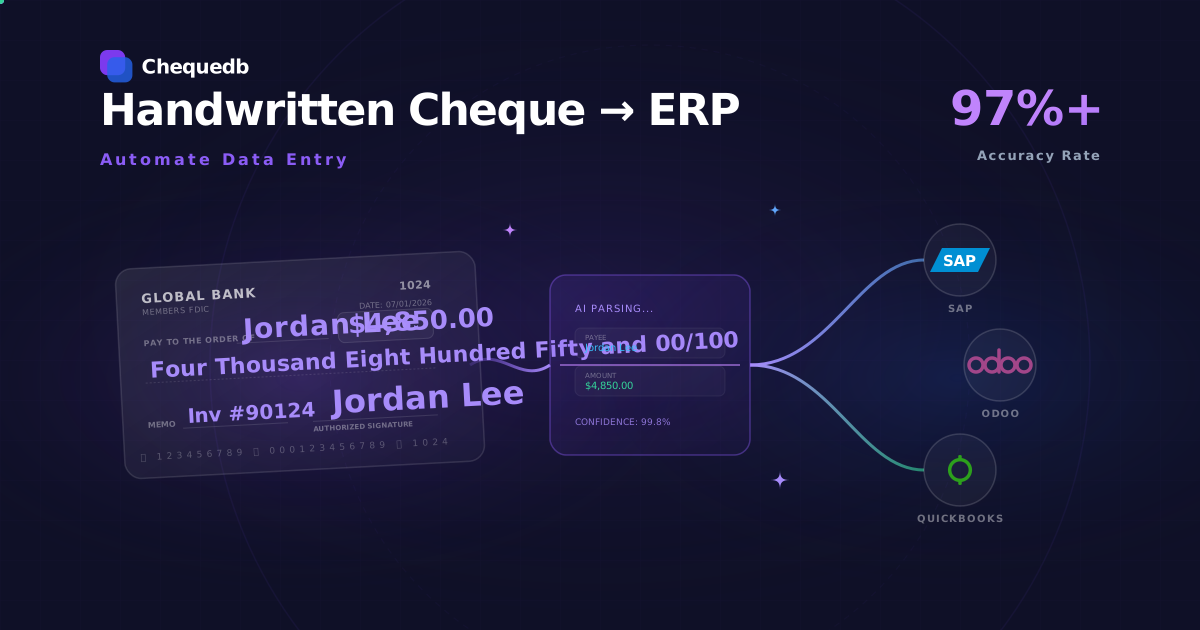
If you manage a treasury that still receives handwritten cheques and enters them manually into your ERP system, you already know the pain points: the keystroke errors, the reconciliation delays, the audit trail gaps, and the staff time consumed by data entry that adds no strategic value.
Handwritten cheques present a harder automation problem than printed cheques. Most OCR tools — Tesseract, Google Cloud Vision, AWS Textract — cannot reliably read cursive handwriting, let alone extract the payee name, the written amount in words, and the date from a personal cheque and map them to ERP fields.
Specialised bank check OCR with handwriting (ICR) capability solves this. The technology reads handwritten cheque fields, validates them against each other, and pushes structured data into your ERP via REST API — with per-field confidence scores so your team only touches items the system isn't sure about.
This article covers what it takes to automate handwritten cheque data entry into an ERP, how the extraction pipeline works, and what kind of automation rate treasury teams can expect.
What Makes Handwritten Cheques Hard to Automate
Handwritten cheques are fundamentally different from printed cheques in three ways:
1. Field location varies. The payee line sits at a different position on every bank's cheque layout. The MICR line stays fixed, but amounts, dates, and payee fields shift depending on the bank's template, the cheque type (personal vs business), and the country's cheque format.
2. Handwriting is not uniform. Cursive payee names, rushed numerical amounts, mixed-case written amounts, and stylised dates require a recognition engine trained specifically on cheque handwriting — not general handwriting recognition. "Twenty-five hundred" and "two thousand five hundred" mean the same amount but look completely different as handwritten text.
3. Amount cross-validation requires understanding financial language. The numeric (courtesy) amount and the written (legal) amount must reconcile. A system that simply returns both as text strings misses the most important validation step — verifying that the amount the writer intended matches the amount they wrote in numbers.
Generic OCR tools fail on all three. Bank check OCR with ICR (Intelligent Character Recognition) is designed to handle all of them.
What Bank Check OCR Reads on a Handwritten Cheque
A specialised bank check OCR API extracts these fields from a cheque image:
| Field | What it reads | Typical accuracy |
|---|---|---|
| MICR line | Routing number, account number, cheque serial number | 99.9% |
| Courtesy amount (CAR) | The numeric amount in the amount box | 97.8% |
| Legal amount (LAR) | The written amount in words | 97.1% |
| Payee name | Handwritten or printed payee | 96.5% |
| Date | Issue date with format normalisation | 98%+ |
| Signature region | Location detection (verification is a separate step) | — |
These accuracies are per-field and measured against 10M+ production cheques. Every field also returns a confidence score (0.0–1.0) so you can set automatic acceptance thresholds per field.
Low-confidence handwritten fields — a rushed signature, an unusual payee name spelling, a partially illegible amount — route to a human review queue rather than being posted with uncertain values. This is the mechanism that prevents high-confidence wrong reads from reaching your ERP.
The Integration Architecture: Cheque Image → Fields → ERP
The pipeline for automating handwritten cheque data entry into an ERP looks like this:
Cheque image → Bank check OCR API → Structured JSON → ERP connector → ERP journals, with low-confidence fields routing to a human review queue for correction.
Step 1: Capture
A cheque image arrives via mobile app, scanner, or kiosk. Minimum 200 DPI, front and back. The image quality gate rejects blurry, skewed, or low-resolution captures before any recognition runs.
Step 2: Extract
The bank check OCR API processes the image and returns structured JSON with per-field values, confidence scores, and validation status. Fields include the MICR account number (for GL posting), the courtesy and legal amounts (cross-validated for match), the payee name, and the date.
Step 3: Push to ERP
A lightweight connector maps the extracted fields to your ERP's journal entry format and posts them — to SAP, Odoo, QuickBooks, or any custom ERP via REST API. The integration is idempotent and control totals are reconciled at every handoff.
Step 4: Attach audit trail
Every extraction event — the raw OCR read, any human correction, the approval decision, the ERP post acknowledgement — is logged with a trace ID that links back to the original cheque image.
Example: How This Works with Odoo
Odoo is a common ERP used by treasury teams across Asia, Africa, and the Middle East. Here is how a handwritten cheque automation pipeline integrates with it in practice.
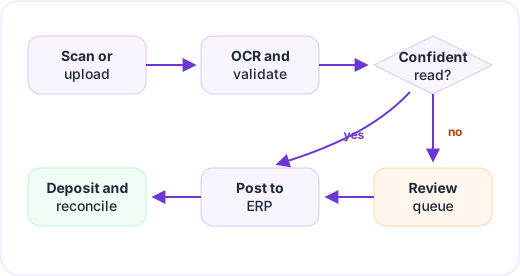
The flow is straightforward: a staff member uploads a cheque image from a scanner or phone. The OCR engine extracts the handwritten fields — amount, payee, date, MICR — and attaches confidence scores. If all fields are high-confidence, Odoo creates a payment automatically. If any field is uncertain, the cheque lands in a review queue inside Odoo where a person checks the image, corrects if needed, and approves.
After approval, cheques are grouped into a batch deposit. When the bank statement arrives, the deposit is reconciled against the registered payments. The entire chain — from the original image through every correction and approval to the final reconciliation — is on the audit trail.
The key rule: Odoo stays the accounting system of record. The OCR system stays the capture and validation engine. They talk through a thin integration layer — a small custom Odoo module that calls the OCR API and uses Odoo's native payment and reconciliation models. No direct database writes, no forcing Odoo's built-in OCR to process cheques.
For the quickest start, the OCR system can export a CSV of validated cheque data that Odoo imports as bank transactions. That requires almost no Odoo development and lets a team validate the workflow before building a deeper integration.
What Automation Rate Can You Expect?
The automation rate for handwritten cheques depends on handwriting quality, image capture consistency, and the confidence thresholds your team sets.
| Scenario | Straight-through processing rate |
|---|---|
| Personal cheques, mobile capture, moderate handwriting | 75–85% |
| Business cheques, scanner capture, mostly printed | 90–95% |
| Mixed cheque types, good image quality, 0.85 confidence threshold | 80–90% |
| All items including poor handwriting and poor images | 65–75% (remainder → review queue) |
Items that fall below confidence thresholds route to a human review queue, where a reviewer sees the cheque image alongside the extracted fields and can correct or confirm each value. Those corrections feed back into the ERP and are logged for audit.
The remaining manual work is a fraction of what it would be without automation — instead of typing every field for every cheque, your team only touches the uncertain ones.
Why This Matters for Treasury and Corporate Finance Teams
For a treasury managing a group of companies, the benefits of automating handwritten cheque data entry are structural:
Eliminate keystroke errors. A misread amount or a transposed account number in a manual entry can cost days of reconciliation work. Automation with cross-validated fields eliminates the most common manual entry errors at the source.
Close books faster. Manual cheque data entry is often the bottleneck in AP month-end close. Automation moves the data in seconds instead of hours or days.
Maintain audit trail integrity. A manual process creates no automatic audit trail. An automated pipeline records every extraction, correction, and posting event with trace IDs — satisfying audit requirements without additional effort.
Enable multi-entity consolidation. A treasury managing cheques across multiple subsidiaries can route extracted data to the correct ERP instance, GL account, and legal entity automatically based on the MICR line account number or a configurable mapping rule.
Getting Started
The fastest path to automating handwritten cheque data entry is:
-
Validate your cheque types. Send a sample set of your handwritten cheques through the extraction pipeline and review the accuracy report. Chequedb provides a test sandbox with field-level accuracy metrics per image source.
-
Map fields to your ERP. Identify which extracted fields (account, amount, payee, date) map to which ERP fields in your journal entry format.
-
Configure confidence thresholds. Set the per-field confidence levels at which items auto-post vs route to human review. Start conservative (e.g., 0.90) and tune as the system learns your cheque mix.
-
Test the integration. Use the REST API or webhook target to push test extractions into your ERP sandbox. Verify idempotency, control totals, and error handling.
-
Go live with exception monitoring. Start with a pilot subset of cheques, monitor the exception queue, and expand as your team gains confidence in the automation rate.
For a technical walkthrough of the extraction pipeline, see Cheque Data Extraction. For API documentation and SDK integration, see the Chequedb API. To discuss your specific ERP setup, book a demo.
Frequently Asked Questions
Can bank check OCR handle handwritten cheques from different countries?
Yes. Chequedb handles cheque formats across 40+ countries. The field-specific ICR models are trained on handwriting samples from each region, and the parser understands regional amount language (lakhs, naira only, no cents, k, etc.).
What accuracy can I expect for handwritten cheque OCR?
Per-field accuracy: 97.8% on the numeric amount, 97.1% on the written amount in words, and 96.5% on the payee name. These are field-level metrics, not a single document-level percentage. Low-confidence fields route to human review.
Does the system integrate with SAP, Oracle, or QuickBooks?
Chequedb provides a REST API that can connect to any ERP with HTTP capabilities. The integration supports idempotent posting, control totals, error handling, and full audit trail synchronisation. Custom connectors for specific ERPs are available through the implementation program.
How long does implementation take?
A standard integration connecting bank check OCR to an ERP typically takes 2–4 weeks, including sandbox testing, confidence threshold tuning, and go-live. Simple cloud deployments can be faster.
Can the system handle high-volume batch processing?
Yes. The extraction API supports both synchronous (per-item, sub-second) and asynchronous (batch, thousands per minute) processing modes with webhook notifications.